From Done Offers to Invoices – How ExusTrans Billing Works
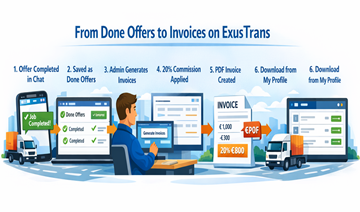
The ExusTrans billing workflow is designed to eliminate manual errors, prevent disputes, and provide clear financial documentation for all completed transport services.
Overview of the ExusTrans Billing Workflow
Every invoice on ExusTrans is generated using verified platform data. This ensures that only completed and confirmed transport jobs are included in billing.
- 🚛 Transport order is completed
- 💬 Offer is confirmed in chat
- 📁 Offer is stored as Done Offer
- 🧑💼 Admin reviews billing period
- 🧾 Invoice is generated
- 📄 PDF is issued and stored
Step 1: Transport Offers Are Completed in Chat
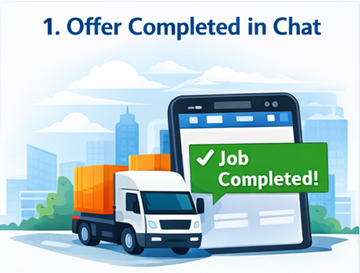
After a delivery is finished, both parties confirm completion in the ExusTrans chat system. This confirmation represents the official end of the transport service.
- 📱 Confirmation is made inside chat
- 📦 Delivery status is verified
- 💬 Final price and costs are confirmed
- 🔒 Record is locked for billing
Only offers that are fully confirmed by both sides can proceed to the invoicing stage.
Step 2: Completed Offers Are Stored as Done Offers
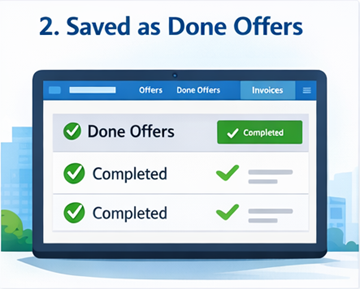
Once confirmed, each finished transport is saved in the system as a Done Offer. This record becomes the official financial reference for invoicing.
- 📌 Location: My Profile → Done Offers
- 🧾 Final agreed price
- 🛣️ Approved tolls and extras
- 📍 Route and delivery details
- 🕒 Completion timestamp
Done Offers cannot be edited after confirmation. This guarantees billing integrity and prevents retroactive changes.
Step 3: Validation and Preparation for Billing
Before invoice generation, the system automatically validates all Done Offers to ensure data consistency.
- 🔍 Verification of completion status
- 📄 Validation of prices and costs
- 🏢 Check of company details
- 💶 VAT and country verification
- ⚠️ Detection of missing information
Offers that fail validation are temporarily excluded until corrected.
Step 4: Admin Generates Invoices Twice Per Month
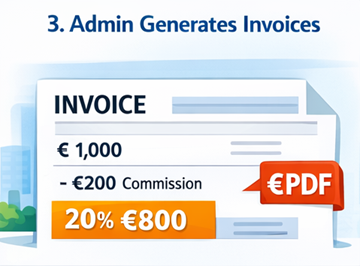
Invoices on ExusTrans are generated by administrators according to fixed billing cycles. This guarantees predictable accounting periods.
- 📅 Period 1: 1st – 14th of the month
- 📅 Period 2: 15th – end of month
- 📊 Only validated Done Offers included
- 🧠 Automatic grouping per customer and carrier
This centralized generation process ensures consistency and regulatory compliance.
Step 5: Automatic Commission Calculation
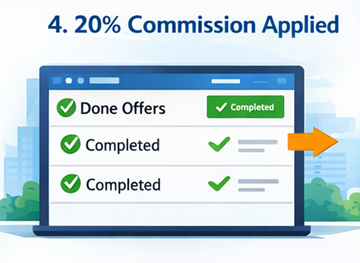
ExusTrans applies a standard platform commission to carrier services. This commission is calculated automatically and transparently.
- 🧮 Standard rate: 20%
- 📌 Applied to net transport price
- ✅ Included in customer invoice
- 📄 Visible on billing documents
This system prevents incorrect pricing and ensures that carriers always calculate offers correctly.
Step 6: VAT and Tax Rules Are Applied Automatically
During invoice creation, the system determines the correct VAT treatment based on company location and registration data.
- 🇧🇪 Belgian VAT (21%) when applicable
- 🇪🇺 EU reverse charge
- 🌍 Non-EU outside scope
- 📑 Legal references added
This process ensures that invoices comply with Belgian and European regulations.
Step 7: PDF Invoices Are Generated
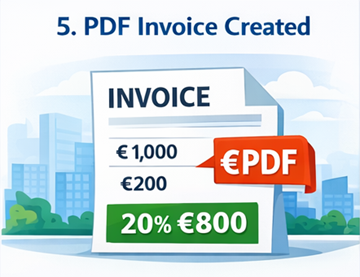
After calculation and validation, ExusTrans automatically generates legally compliant PDF invoices.
- 🧾 Unique invoice number
- 🏢 Company identification
- 💶 Price breakdown
- 📑 VAT notes
- 📆 Issue date and period
These PDF documents are suitable for accounting, audits, and financial reporting.
Step 8: Access and Download Invoices
All generated invoices are stored securely in user accounts and remain accessible at any time.
- 👤 Location: My Profile → Invoices
- ⬇️ One-click PDF download
- 📊 Invoice status tracking
- 📁 Historical archive
Users are encouraged to download and archive invoices for their own accounting records.
Benefits of the ExusTrans Billing System
The automated billing workflow provides significant advantages for both customers and carriers.
- ✅ Reduced administrative workload
- ✅ Transparent pricing
- ✅ Lower dispute risk
- ✅ Audit-ready documentation
- ✅ Predictable billing cycles
❓ Frequently Asked Questions (FAQ)
When does an offer become a Done Offer?
An offer becomes a Done Offer after the transport is completed and both parties confirm the delivery in chat.
Where can I see my Done Offers?
You can find all completed jobs in My Profile → Done Offers.
Can I edit a Done Offer after confirmation?
No. Done Offers are locked after confirmation to ensure transparent and reliable billing.
How often are invoices generated?
Invoices are generated twice per month: from the 1st to the 14th and from the 15th to the end of the month.
Who generates the invoices?
Invoices are generated by ExusTrans administrators using verified Done Offer data.
Are all completed offers included in the next invoice?
Yes. All validated Done Offers within the billing period are included in the next invoice.
How is the 20% commission applied?
The commission is calculated automatically on the carrier’s net price and included in the final invoice.
When is VAT calculated?
VAT is calculated automatically during invoice generation based on company location and VAT registration data.
When is the PDF invoice created?
PDF invoices are generated immediately after the billing cycle is completed and approved.
Where can I download my invoices?
All invoices are available in My Profile → Invoices and can be downloaded at any time.
What happens if my Done Offer contains incorrect information?
You should contact ExusTrans support immediately. Corrections can only be made before invoice generation.
Why is my Done Offer missing from the invoice?
A Done Offer may be excluded if it is incomplete, under review, or missing required data.
Can I receive invoices more frequently?
No. Invoices are issued according to fixed billing cycles to ensure consistent accounting.
How long are invoices stored on ExusTrans?
Invoices are stored securely in your account and remain available in accordance with legal retention requirements.
Do I need to keep my own invoice copies?
Yes. Users are responsible for downloading and archiving invoices for their own accounting and tax records.
Conclusion
From chat confirmation to final PDF delivery, ExusTrans manages the entire invoicing workflow in a structured and transparent way. By using Done Offers as the single source of truth, applying automatic commission and VAT rules, and generating compliant documents, the platform ensures reliable billing for all users.
eXus Dev